

Work where you design
Convert compatible images inside Canva. If a graphic is not supported directly, export it as a transparent PNG and upload it again.
Made for Canva creators
Create custom, fillable frames from your own images directly inside Canva. Select a compatible image, convert it, and bring a one-of-a-kind frame into your design.
More creative freedom
Framespark turns it into something you can actually use without breaking your creative flow.
Convert compatible images inside Canva. If a graphic is not supported directly, export it as a transparent PNG and upload it again.
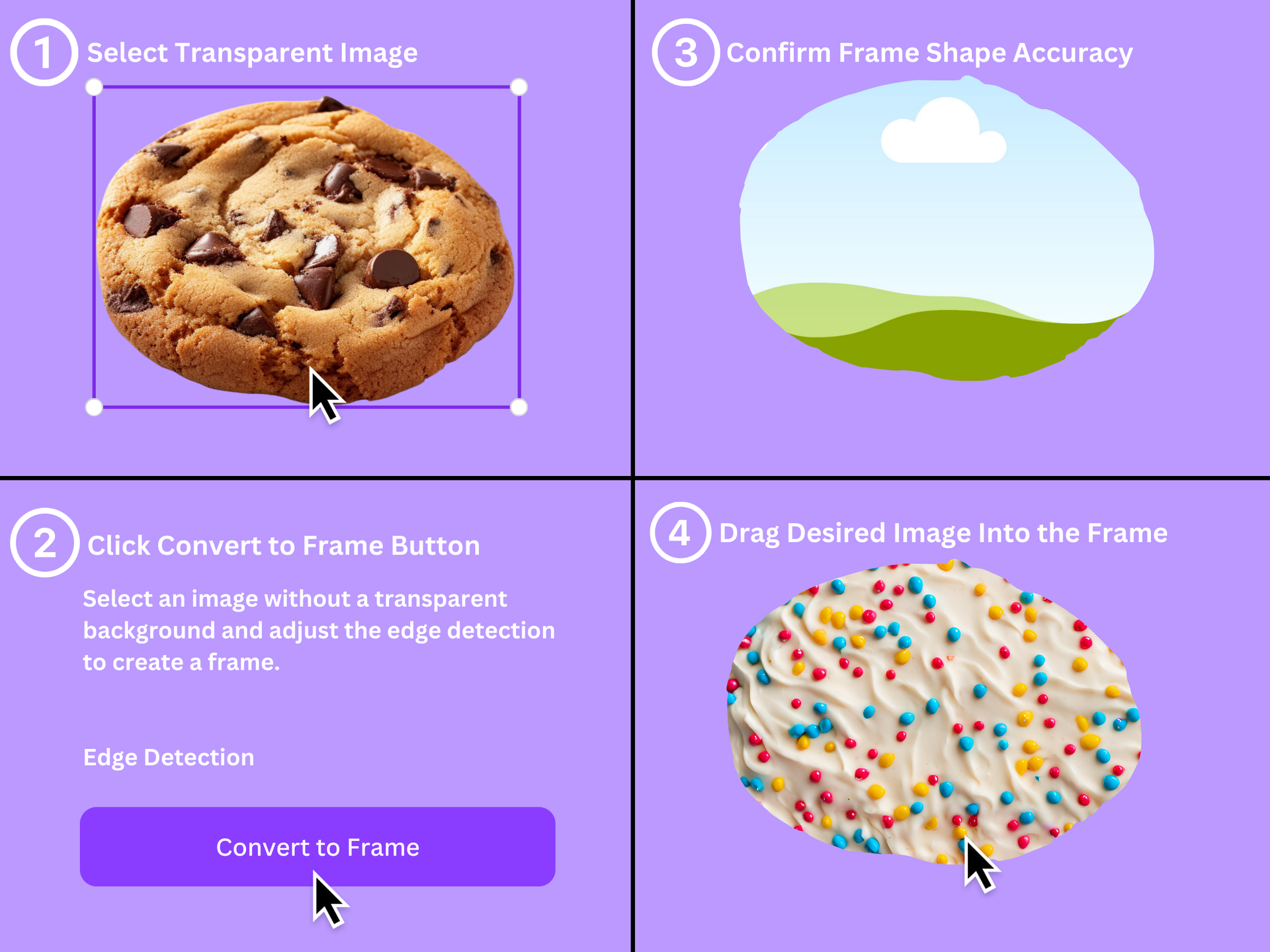
Select a compatible image and click Convert to Frame. Framespark automatically captures the image’s outer shape.
Create frames for personal and commercial designs, then fill them with photos, textures, or brand imagery.
Framespark supports PNG, JPG, and static GIF files, with transparent PNGs giving the cleanest results.
Made with Framespark
From one clean silhouette to several separate pieces, Framespark turns the details in your image into frames you can fill.
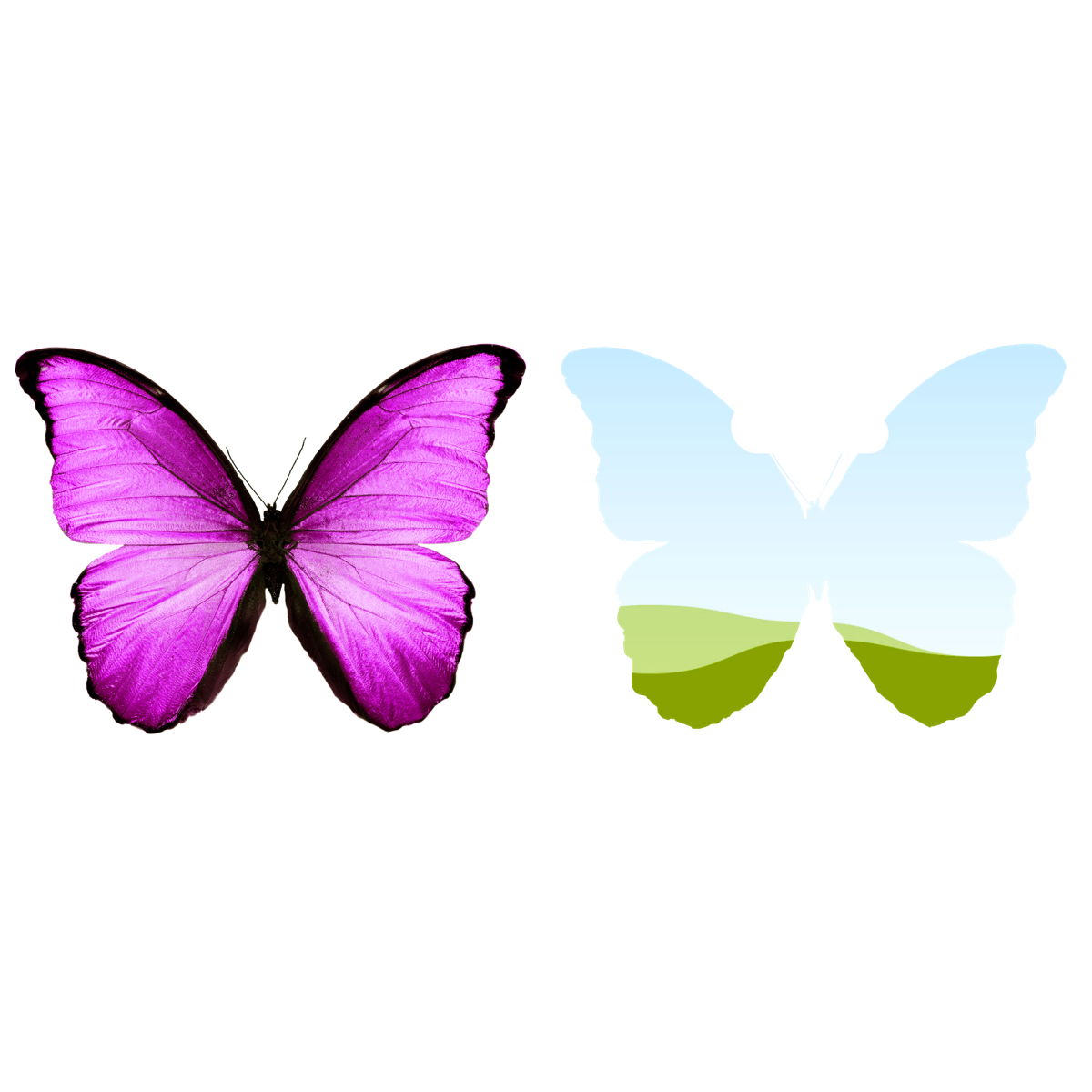
Single image
A butterfly’s complete silhouette becomes one fillable frame, ready for a photo, pattern, texture, or brand visual.
Three steps. Endless shapes.
A clear path from a compatible image to a custom frame that is ready for your photos, patterns, and ideas.
Select a PNG, JPG, or static GIF in Canva. If a Canva graphic is incompatible, export it as a transparent PNG and upload it again.
Select the compatible image and click Convert to Frame. Framespark automatically captures its outer silhouette.
Add the generated frame to the design and drop in a photo, texture, pattern, or other visual.
Stay in your flow
Skip the back-and-forth between specialty tools. Framespark lets you experiment with unique silhouettes and build reusable photo frames in the same Canva workspace as your design.
Loved around the world
From classrooms to creative businesses, FrameSpark is helping people turn ideas into frames they can use again and again.
I have been using Framespark for my students and we love it! HIGHLY RECOMMENDED especially for the classroom.O Framespark é ótimo para o trabalho personalizado que eu faço no meu negócio.English translationFramespark is great for the custom work I do in my business.
このアプリ、フレーム作りにとって本当に画期的だねEnglish translationThis app is truly groundbreaking for making frames.
Good to know
Everything you need to know before turning your next idea into a custom frame.
Try FrameSpark free in Canva.Framespark converts the outside shape of an image into a Canva frame. Fill your new frame with photos, patterns, textures, and more for social posts, invitations, product graphics, and client work.
You can use PNG, JPG, and static GIF files up to 30MB. For the most precise outline, start with a transparent PNG that has a clearly defined subject.
Every account includes three free frame creations, so you can see how Framespark fits your workflow before upgrading.
A one-time $9.99 payment unlocks unlimited frame creation attempts. It is not a subscription, so there are no monthly payments or automatic renewals.
Yes. You can create frames for personal or commercial use, provided you own or have permission to use the source image and follow Canva’s terms.
Helpful tips
A few quick fixes for the moments when an image needs extra attention.
Remove the background first and choose an image with a clear outer silhouette. Transparent PNGs usually produce the most predictable frame edge.
Some Canva graphics need to be downloaded as a PNG with the background removed, then uploaded back into Canva before Framespark can process them.
Not every image is compatible. Remove the background, simplify a highly detailed image, or export it as a PNG and upload that version to Canva. If the result is still incomplete, try another source image.
The selected element may be in an unsupported format. Download it as a PNG, upload that version to Canva, select it, and try again.
Refresh the Canva page and reopen Framespark. If the image still does not process, export it as a PNG with the background removed and upload it again, or try a simpler source image.
Still need a hand? Email the Framespark team.
Your next frame starts here
Try three frames free. When you’re ready, unlock unlimited creations for one simple payment of $9.99.
Try FrameSpark free in Canva.One-time payment · No subscription · No automatic renewals


